Buying a Pre-Owned MacBook in India: The 15-Minute Inspection Checklist
Fifteen minutes now can save you a battery, a screen or a locked Mac.
A pre-owned MacBook is good value when you know what to check. This is the order we would work in, with the Apple screens to read and the red flags that mean walk away.
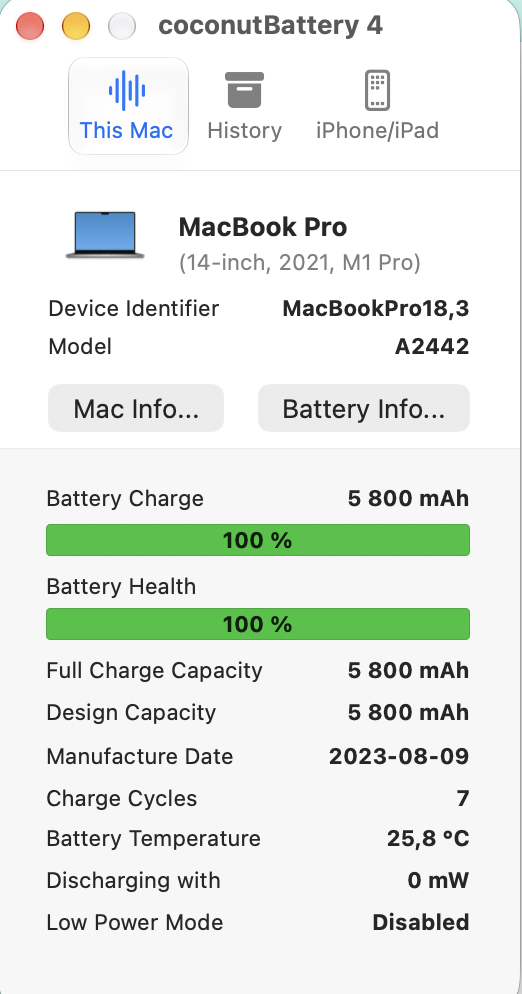
The short answer
- Do first: About This Mac, the Apple Account lock, battery cycle count and Condition, Apple Diagnostics, Check Coverage.
- Battery: Apple lists 1,000 cycles as the maximum for most recent MacBooks; Service Recommended means you can keep using the Mac.
- Walk away from: a Mac that asks for someone else’s Apple Account, a dark band on the screen, or a swollen case.
- Get in writing: an invoice with the serial number and the warranty terms.
Check steps come from Apple Support pages we opened on 31 Oct 2026: battery cycle counts, Service Recommended, Apple Diagnostics, Check Coverage, Activation Lock and the Mac erase page. The 12-point order and the walk-away rules are our own judgement and were not tested against a set of units. We have no customer cases or photos yet, and this page does not claim any.
What should you check on a pre-owned MacBook before paying?
Twelve checks, in the order we would do them. The first five need only the Mac and a Wi-Fi connection, and they catch the expensive problems: a locked Mac, a worn battery, a failing part. If you are buying remotely, ask the seller for screenshots of the same screens.
| # | Check | How | Walk away or negotiate if |
|---|---|---|---|
| 1 | Model matches the listing | Apple menu, About This Mac. Compare chip, memory, storage and year with the advert. See our model guide. | Anything differs from the advert |
| 2 | Activation Lock and Apple Account | Switch it on. If the first-start screen asks for a previous owner’s Apple Account, stop. Apple says the account password is required to reactivate a locked Mac. | The seller cannot sign out or erase it in front of you |
| 3 | Battery cycle count and condition | Hold Option, Apple menu, System Information, Power. Read Cycle Count and Condition. | Condition says Service Recommended, or the count is near the model’s limit (Apple lists 1,000 cycles for most recent models) |
| 4 | Apple Diagnostics | Apple silicon: shut down, hold the power button until startup options appear, then press Command-D. Intel: hold D at startup. | It returns a reference code. Note it and ask what it means |
| 5 | Coverage status | Enter the serial on Apple’s Check Coverage page, or System Settings, General, AppleCare & Warranty. | The serial gives a different model from the one in front of you |
| 6 | Display | Plain white, black and grey screens at full brightness. Look for dead pixels, yellow patches, a dark band at the bottom or marks. | Any dark band, patch or stuck pixel (see our Flexgate guide for the Pro fault) |
| 7 | Keyboard and trackpad | Type in a text document, press every key, click in all four corners of the trackpad. | Sticking or repeating keys, a trackpad that does not click evenly |
| 8 | Ports and charging | Plug in the charger, a USB device, headphones and an external display if you can. | Charging only works at one angle, or a port is loose |
| 9 | Speakers, microphone and camera | Play a sound, record a voice memo, open Photo Booth. | Crackling, silence or no camera image |
| 10 | Wi-Fi and Bluetooth | Join a network, pair headphones. | It will not stay connected |
| 11 | Case and hinge | Look for dents, a lifting trackpad or a bulging base. Open and close the lid. | A lifted trackpad or bulging case can mean a swollen battery. Do not buy |
| 12 | Paperwork | A GST invoice with the serial number, and the warranty terms in writing. | You get promises but nothing written |
How do you read battery health properly?
Open System Information (hold Option, click the Apple menu) and choose Power. Two lines matter: Cycle Count and Condition. Apple says its notebooks are designed to hold up to 80% of original capacity at their maximum cycle count, and lists 1,000 as the maximum for the Air from 2012 and the 13-, 14- and 16-inch Pros. When the Condition reads Service Recommended, Apple says you can keep using the Mac. That is why we treat a battery as a price lever and not an automatic reason to walk away. A new battery is a normal part of owning an older Mac. Our battery guide shows the cost by grade.
What does a repaired Mac hide?
Apple adds one warning that most checklists miss. On an Apple silicon Mac running macOS Tahoe 26 or later, a part taken from another product and used in a repair could be locked to someone else’s Apple Account. If you are unsure about a repair history, Apple points to its Repair Assistant. In practice, ask the seller whether any part has been replaced, and run Apple Diagnostics.
Which mistakes cost buyers the most?
- Skipping the lock check. A locked Mac is not yours to use, whatever the price. Our Activation Lock guide explains what the seller must do.
- Judging battery only by looks. A clean Mac can have a worn battery. Read the cycle count.
- Buying on a photo of About This Mac only. Ask for the battery screen too, for the same unit.
- Not checking the keyboard and screen on older Pros. Both can fail, and a repair adds to the price you pay. The repair or replace guide shows how much.
- Taking a verbal warranty. Get it written, with its length and what it covers.
Buying a pre-owned Mac from us instead?
You can run the same twelve checks on any unit, ours included. For a unit you are interested in, ask Aparna for the About This Mac and Battery screens of that exact Mac before you decide.
Questions we get asked
How long does the inspection take?
About 15 minutes if you do the first five checks first and stop at the first red flag.
Is a battery at 85% health fine?
Apple does not give a "fine" percentage on its pages. It gives a cycle limit and says that at the limit a battery is designed to hold up to 80% of original capacity. Use cycle count and Condition, then price the battery into the deal.
Can I check Activation Lock without the seller?
Apple’s page does not give a buyer test. The practical check is to start the Mac from erased and see whether it asks for a previous owner’s Apple Account. If it does, the seller must remove the Mac from their account.
What if the seller will not let me run Apple Diagnostics?
Treat that as a red flag. Apple describes it as a built-in test that helps find which hardware component might be at fault.
Do I need to check the macOS version?
Yes. Check that the Mac can run the macOS you need, for example from the macOS 27 compatibility guide.
Want the screens for a specific Mac first?
Tell Aparna which Mac you are looking at. We will send the About This Mac and battery screens for that unit, and suggest alternatives if it is not the right fit.
Checked 31 Oct 2026. Apple’s cycle limits apply to the models Apple lists on its battery page.
- Determine battery cycle count for Mac notebooks, Apple Support
- About the battery Service Recommended message, Apple Support
- Use Apple Diagnostics to test your Mac, Apple Support
- Find information about your warranty or AppleCare plan, Apple Support
- Activation Lock for Mac, Apple Support
- Erase your Mac and reset it to factory settings, Apple Support